I am a senior programmer for a $5 billion dollar corporation. I program enterprise-wide applications and am also a Microsoft Certified Solutions Developer (MCSD).
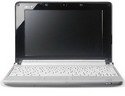
I have to carry a laptop issued by my company for remote access. My workplace does not like us to web-surf for personal reasons on company computers so I got a Verizon Wireless Broadband account and the Acer Aspire One. Plus, with the work laptop and my personal laptop, my bag was pretty heavy to carry since my usual lug-around laptop is a bit old and heavy. I wanted a light computer to use for personal reasons while at work, at lunch or traveling.
I just got my Acer Aspire One just yesterday and have put it through some pretty good performance tests.
The Acer Aspire One is a sweet little machine. I was worried about other postings I read regarding the fan noise. The fan does have a little sound but with ambient noise in public or at home with the TV on, you don't notice it. When it's quiet, you have to put the computer up to your ear to really hear the fan noise.
Performance is very good for the little Intel Atom 1.6 GHz processor. It does help having the 1 GB of RAM. I wouldn't go to the trouble of trying to take the machine apart to add the extra 500 MB of RAM this little computer will support. If you need more memory, I would switch to a conventional laptop or desktop computer.
My Verizon Wireless Broadband service runs very well on this computer. I can access my WebMail, read news and whatever with very good performance.
A big plus is the three available USB ports. You can plug in a wireless mouse or standard keyboard easily and still have a port left over for whatever else you want to connect. The 160 GB hard drive is also nice. I shopped for other models and wanted more drive space than the ones I saw at my local Best Buy. Some models I saw only had 8 GB of drive space for about the same price of the Acer Aspire One.
The Acer Aspire One fits comfortably on your lap and once you get a feel for the little keyboard, typing is not too bad. If you can text on a cell phone keyboard, you can get used to this little keyboard with no trouble. I would say the keyboard is about a third of the size smaller than that of a standard keyboard.
It is ideal for surfing the web, doing email, shopping, balancing your checkbook, transferring pictures from your camera card, etc. on the go if you need to do some light computing while traveling or on your lunch hour.
It is not good for streaming video. It does pause a bit playing videos on YouTube. After the video is cached into memory, it does better so you will be hitting the replay button after viewing the videos on YouTube once. It would not be good for streaming movies from NetFlix.
If you want to run videos on YouTube, be sure to use some ear buds or headphones. The sound is much better with ear buds and depending on the video, I found I was turning down the volume.
The computer does come with a trial version of Microsoft Office but I uninstalled this application. It also comes with Microsoft Works which is just fine for this little computer. I typed this review on my Acer Aspire One. If you're going to do heavy word processing or more extensive work, again, use a conventional computer.
I did tweak the Windows XP Home setup properties to allow for bigger text for menus and icons. Once you get the environment set to your liking, it is a pleasant experience using this cute little computer.
Do not install Windows Vista on the Acer Aspire One. I don't think it would be a good candidate for Windows XP Professional either. The Windows Home version is quite suitable for this computer. The Linux version should also do nicely. The operating system you want is merely what you are comfortable with and like using.
I would also recommend the Acer Aspire One for a child's computer.
I'm very pleased with the purchase of the Acer Aspire One and for the price; the Acer Aspire One is worth every penny.
Get more detail about
Acer Aspire One AOA150-1126 8.9-Inch Netbook - White.
